Article: How to Upload a MOC Parts List and Buy Custom Brick Parts Online
How to Upload a MOC Parts List and Buy Custom Brick Parts Online
Finding the right building brick parts can be difficult, especially when you are working on a custom MOC, rebuilding an older set, replacing missing pieces, or preparing parts for a large creative project. Some parts may be hard to find, some colors may be discontinued, and manually searching for every single brick can take a lot of time.
PartsBricks was created to make this process easier. Instead of forcing builders to change their designs based on what is available, PartsBricks helps creators source and custom-make brick parts based on real project needs. Whether you need a small quantity for a personal build or bulk parts for a larger project, you can use the PartsBricks parts list tool to upload your file, check available parts, review out-of-stock items, and continue with your order.
What Is the PartsBricks Parts List Tool?
The PartsBricks parts list tool is designed for builders who already have a parts list for a MOC, custom model, missing pieces, or bulk brick project.
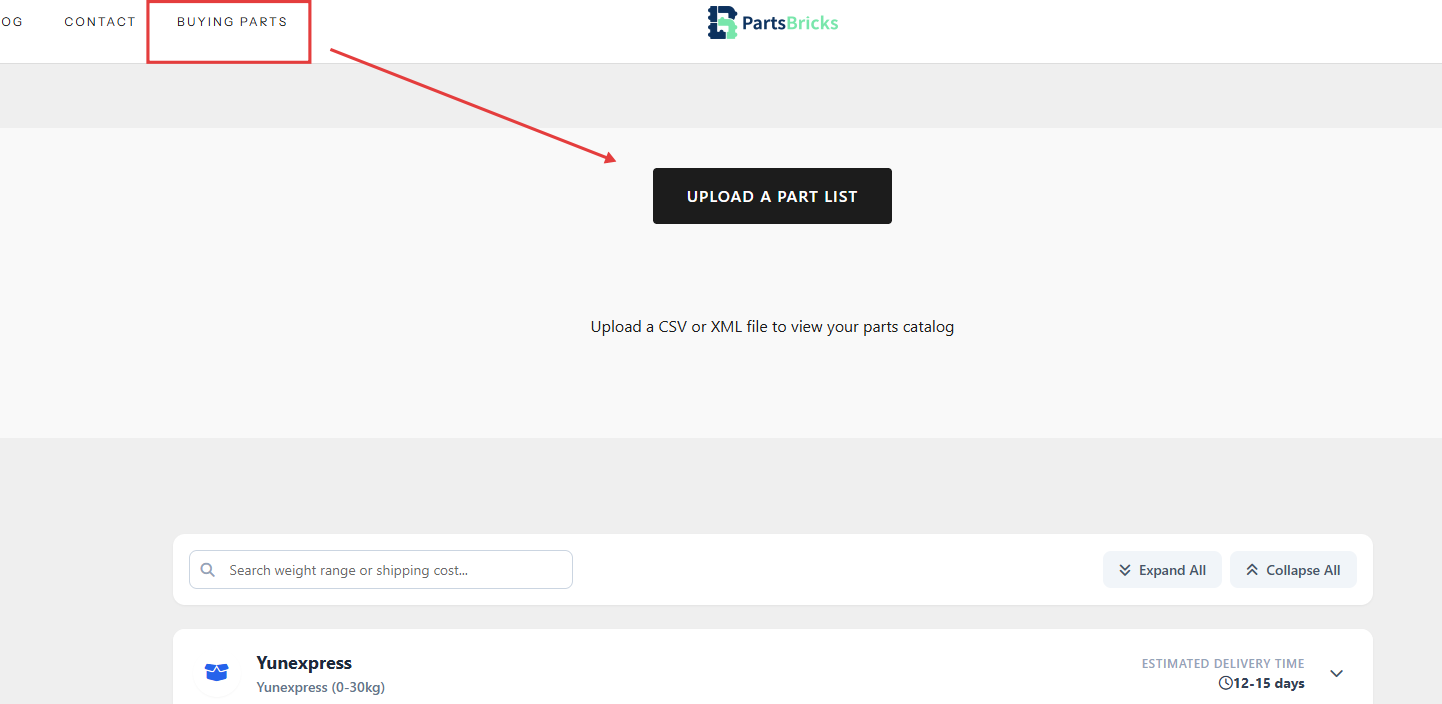
You can upload a CSV or XML parts list file to view your parts catalog on the website. After the file is processed, the tool helps separate available parts from out-of-stock parts, so you can quickly understand which brick parts can be added to your order and which items may need further checking.


This is especially useful for MOC designers, collectors, educators, stores, model builders, and anyone who needs a clear way to organize building brick parts before ordering.
Why Upload a Parts List Instead of Searching Manually?
A custom brick project can contain dozens, hundreds, or even thousands of individual pieces. Searching for each part manually can be slow and confusing, especially when part numbers, colors, quantities, and availability need to match your design.
By uploading a parts list, you can save time and reduce mistakes. The system helps you review your list in one place, check available parts, identify out-of-stock items, and see the current total for the items that can be added.
For builders working on MOC projects, this makes the ordering process much more efficient than manually searching one brick at a time.
What Information Can You See After Uploading a Parts List?
After uploading your CSV or XML file, the PartsBricks parts list page helps you review key order information, including:
- Available parts
- Out-of-stock parts
- Item quantity
- Total pieces
- Current order total in USD
- Option to export CSV
- Option to add available items to cart
This gives you a clearer view of your project before placing an order. You can see which items are ready to buy and which parts may require adjustment, replacement, or further confirmation.
What Does “Out of Stock” Mean?
When a part appears as out of stock, it means that the item is not currently available through the automatic parts list result. This does not always mean the part can never be produced or sourced.
PartsBricks focuses on custom-made brick parts produced on demand. For specialized, non-standard, discontinued, or hard-to-find brick parts, further review may be needed. You can still contact the PartsBricks team with your parts list or specific requirements to see whether custom production or an alternative solution is possible.
This is helpful for builders who do not want to limit their creativity only to standard available inventory.
Custom Brick Parts Made for Creative Projects
PartsBricks supports custom brick manufacturing for builders, designers, brands, distributors, and creative projects. The goal is to help turn custom brick ideas into real parts by working from client-provided parts lists and specific requirements.
This service is useful for:
- MOC builders
- Custom model designers
- Missing brick replacement
- Discontinued color or part needs
- Small batch brick projects
- Bulk building block orders
- Educational brick projects
- Store and distributor part sourcing
- Custom printed brick or special effect brick needs
- Gift packaging or kit solutions
Whether you are building one personal model or preparing a larger batch of parts, PartsBricks provides flexible options for different project sizes.
How Shipping and Delivery Work
Shipping and delivery time can vary depending on your order size, production schedule, destination, package weight, and logistics conditions.
Because PartsBricks provides custom-made parts, orders usually include production, quality checking, packaging, and dispatch before shipment. Small orders and bulk orders may require different processing times. Once your order has shipped, tracking information will be sent to your email.
Shipping cost may also depend on your location and order details. For example, some destinations may have weight-based shipping rules, while many other regions may qualify for free shipping according to the current shipping policy. If there are delivery restrictions or address issues, the PartsBricks team will contact you after your order is placed.
Why Builders Choose PartsBricks
PartsBricks is built for creators who need reliable access to brick parts beyond standard sets and limited inventories. The platform helps solve common problems such as missing pieces, hard-to-find colors, limited quantities, and complex MOC parts lists.
Key benefits include:
- Custom-made brick parts
- Parts list upload support
- CSV and XML file upload
- Available and out-of-stock item review
- Flexible small-batch production
- Bulk parts support
- Quality control for consistent fit and color
- Support for MOC designers and creative builders
- Shipping to most countries
For builders who want to focus on design instead of spending hours searching for every piece, PartsBricks provides a more direct way to turn a parts list into a real order.
Start by Uploading Your Parts List
If you already have a MOC parts list, missing parts list, or custom brick project list, you can upload your CSV or XML file on PartsBricks to begin.
The parts list tool will help you check available items, review out-of-stock parts, see the current total, and add available parts to your cart. For special requirements, custom-made parts, bulk production, printing, colors, or packaging needs, you can also contact the PartsBricks team for further support.
Upload your parts list today and make your next custom brick project easier to build.